Power Apps · Power Automate · Copilot Studio

Stop doing by hand what an app can do. We build it inside your Microsoft 365.

Approvals stuck in an inbox, data retyped between systems, reports assembled every Friday. We turn that into apps and flows your team can actually use.

Or write directly: contact@erminewise.com

example · purchase approval
PAApprovals · Microsoft Teams · just now

Purchase request #1042 needs your approval

Requested by
Operations team
Item
2 laptops for new hires
Amount
$2,480.00
Routed to
Department manager (over $1,000)
ApproveReject
#1042 · laptopsWaiting
#1041 · office chairsApproved
#1040 · software licenseApproved
What we build with
  • Power Apps
  • Power Automate
  • Power Automate Desktop
  • Copilot Studio
  • Power BI
  • SharePoint & Lists
  • Python
  • SQL
25%

Share of time teams spend searching for answers.
Atlassian, State of Teams 2025 (12,000 knowledge workers, 200 executives).

Most of that time isn't hard work. It's lost work.

It hides in small, repeated steps nobody was hired to do. Each one takes minutes. Together they eat the week.

01“Did anyone approve this yet?”
02The same data typed into two or three systems.
03A spreadsheet only one person knows how to update.
04“Who decided that, and when?” and no one can find it.

Services

What we build

We start from the process, not the tool. Then we pick the simplest piece of the Microsoft stack that solves it.

01

Business apps

Replace paper forms and shared spreadsheets with an app your team opens on desktop or phone.

Power Apps
02

Approvals & workflows

Requests that route themselves to the right person, with reminders and a full history.

Power Automate
03

Desktop automation

For older systems with no API: a bot does the clicking and typing, on a schedule or on demand.

PA Desktop · Python RPA
04

AI agents

Assistants that answer from your own documents or start a process from a chat in Teams.

Copilot Studio
05

Dashboards

The numbers you build by hand every week, updated on their own.

Power BI
06

Integrations

Connect the systems you already have so data moves without copy and paste.

REST APIs · SQL

Work

Two apps we've built

Two internal apps built for a member association. Screens are recreated from the real apps with sample data.

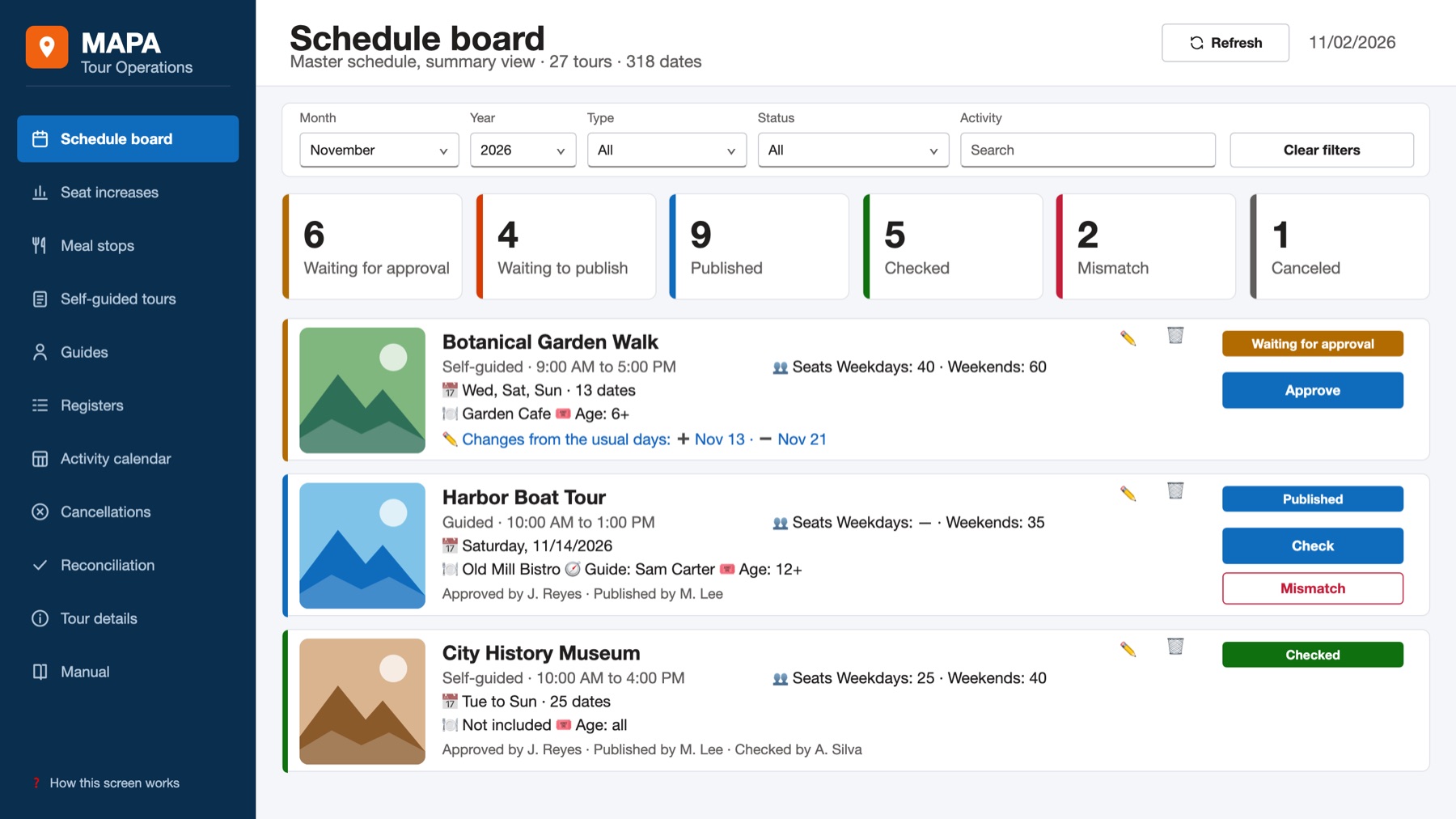
Tour program · Brightway Teachers Association*

MAPA: a month of tours planned on one board

The tour schedule was built by hand in Excel. Now one button generates the month's dates from each tour's rules, and every tour moves from approval to final check on a single board.

400+tour dates a month
~30tours managed
7Power Automate flows
2×daily Power BI sync

Power Apps · Power Automate · SharePoint · Power BI · Teams
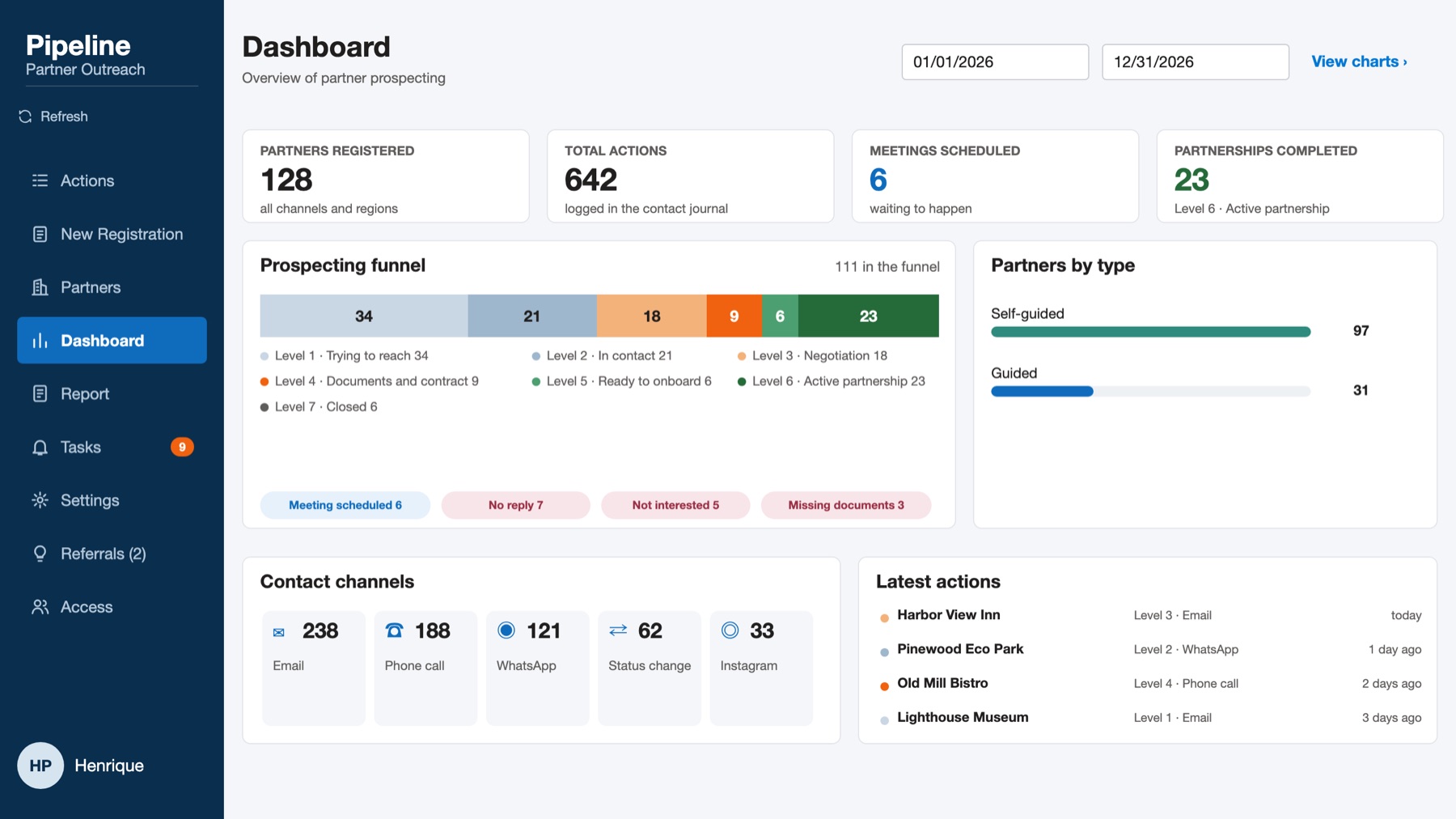
Partner outreach · Brightway Teachers Association*

Pipeline: no partner lead goes quiet unnoticed

Follow-ups with potential partners slipped and nobody noticed. The app takes each partner through 8 levels, keeps every call, email and WhatsApp in one history and shows the next step.

8levels, first contact to partnership
1shared history per partner
No devneeded to change the rules
88missing dates recovered in old records

Power Apps · SharePoint · Power Automate

* Organization name, people, places and numbers on screen are fictional. The figures in the summaries are from the real projects.

Example

A purchase request, start to finish

The same flow from the video below. Nothing new to install: it runs in the Microsoft 365 tools the team already has.

01

Short form

Someone fills in what they need and how much it costs.

Power Apps
02

Check & route

The flow checks the amount and finds the right approver.

Power Automate
03

One click

The manager gets a card in Teams with two buttons.

Teams · Approvals
04

Record

Who approved, when and why, saved in one list.

SharePoint List

Watch · 1 min

See it in a minute

A short walkthrough of the approval flow above, and the question we ask every client first.

  • No email chains
  • No opening another system
  • A record of every decision

The presenter and the mascot in this video are AI-generated.

How we work

Three steps, one process at a time

Step 1

Map the process

We sit with the people who do the work and write down every step, rule and exception.

You get: process document
Step 2

Build & test

We build in your Microsoft 365 environment and test with real cases before anyone depends on it.

You get: working app or flow
Step 3

Hand over

Your team learns to use it, and you keep the documentation to maintain it.

You get: user guide + tech docs

About

Who you'll work with

Henrique Paixão

Henrique Paixão

Founder · Power Platform developer
Orlando, FL

Builds business apps and approval flows that replace paper and spreadsheets, with data organized in SharePoint and Lists and dashboards in Power BI. Also works on the business side, turning requirements into solutions.

Power AppsPower AutomateSharePointPower BI

What's the one task that makes your team say “why are we still doing this by hand?”

Tell us what it is. We'll reply with how we'd approach it.

Based in
Orlando, Florida